Row Counter: Knitting Buddy 24.7.6
Publisher Description


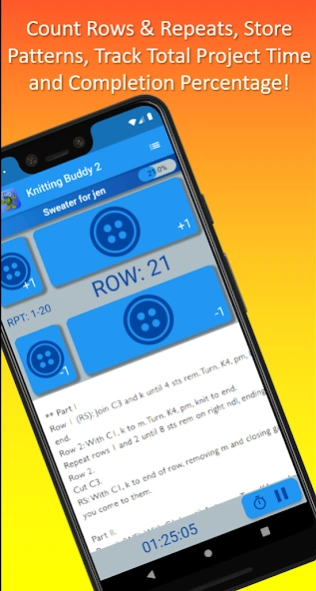

Knitting & Crochet Project Tracker: Count Rows, Stitches, and Repeats.
Knitting & Crochet Buddy 2 is an all-in-one knitting and crochet project tracker. Knitting & Crochet Buddy 2 syncs all of your knitting and crochet data to the cloud and allows you to share the same data between all of your Android and iOS devices.
Knitting and Crochet Buddy 2 has the following features:
----TRACK PROJECTS----
Knitting and Crochet Buddy 2 lets you create knitting and crochet projects, track rows and repeats with the row counter, store your knitting or crochet pattern as a PDF or image, store photos of the knitting or crochet project, keep a project timer, change project themes, store project notes (e.g. project name, status, yarns used, knitting needles, crochet hooks, crafts like knitting, crochet, loom knitting, and other notes, etc.). Add patterns and photos from your phone or cloud storage, like Dropbox and Google Drive. All knitting project data, including photos and patterns, are synced to the cloud and available across all devices.
---- TRACK KNITTING NEEDLES, CROCHET HOOKS, TUNISIAN HOOKS, AND KNITTING LOOMS----
Create knitting needles, crochet hooks, tunisian hooks, and knitting looms. For each knitting needle, crochet hook, or loom in the list, edit the type, size, length, brand, material, whether it is ‘available,’ it’s color (including a color picker!). Add notes for each knitting needle, crochet hook, and knitting loom.
---- CREATE YARN STASH ----
Knitting and Crochet Buddy 2 let's you track your entire yarn stash! The list of fields includes name, weight, color number, dye lot, yardage, color, amount remaining, and notes. Pro users can add a picture of the yarn label. Track your Stash2go!
-- MEASUREMENTS ---
Knitting and Crochet Buddy 2 let's you track measurements of friends and clients. Track 17 different measurements (chest, waste, head circumference, etc). Helpful reference charts guide you through the measurement process.
---- GLOBAL SETTINGS ----
Includes features like leaving the screen on while on the project page, vibrating when buttons are pressed, and showing the time that you last worked on a knitting or crochet project. Customize your experience by showing or hiding certain sections of the application.
---- CHARTS, ABBREVIATIONS, and MEASUREMENTS----
Knitting and Crochet Buddy 2 CHARTS include:
- Crochet Hook Sizes and Crochet Symbols
- Knitting Needle Sizes and Knitting Symbols
- Loom Gauge to Knitting Needle and Crochet Hook equivalents, Loom gauges
- Yarn standards and Laundry/Care standards
- Upload your own charts, too!
ABBREVIATIONS include:
- Knitting, Crochet, Loom Knitting, Measurements, Tunsian Crochet, and US/UK Crochet Term Differences
MEASUREMENTS include:
- Babies, Children, Youth, Womens, Mens, Hands, and Head
---- TOOLS ----
Knitting Calculator / Crochet Calculator: Knitting & Crochet Buddy 2 comes with a row increase calculator and a row decrease calculator that is customized for either knitting or crochet.
Flashlight: There is a flashlight that changes your entire screen to a bright white to help you find your items in the dark!
Ruler: Measure your gauge while you're on the go!
Pro users from the original knitting buddy can import their knitting buddy 1 data file into the application. The Knitting and Crochet Buddy 2 Pro subscription is a monthly subscription to cover all of the costs associated with running the application in the cloud.
Knitting Buddy is on Facebook! https://www.facebook.com/knittingbuddy
About Row Counter: Knitting Buddy 2
The company that develops Row Counter: Knitting Buddy 2 is Colorwork Apps. The latest version released by its developer is 4.7.6.
To install Row Counter: Knitting Buddy 2 on your Android device, just click the green Continue To App button above to start the installation process. The app is listed on our website since 2026-08-31 and was downloaded 6 times. We have already checked if the download link is safe, however for your own protection we recommend that you scan the downloaded app with your antivirus. Your antivirus may detect the Row Counter: Knitting Buddy 2 as malware as malware if the download link to com.colorworkapps.knittingtracker is broken.
How to install Row Counter: Knitting Buddy 2 on your Android device:
- Click on the Continue To App button on our website. This will redirect you to Google Play.
- Once the Row Counter: Knitting Buddy 2 is shown in the Google Play listing of your Android device, you can start its download and installation. Tap on the Install button located below the search bar and to the right of the app icon.
- A pop-up window with the permissions required by Row Counter: Knitting Buddy 2 will be shown. Click on Accept to continue the process.
- Row Counter: Knitting Buddy 2 will be downloaded onto your device, displaying a progress. Once the download completes, the installation will start and you'll get a notification after the installation is finished.
Program Details
System requirements
Download information
Pricing
Version History
version 4.7.6
posted on 2026-08-31
Fix Pro subscription issue
Fix bug where data would sometimes not be saved when closing the application
version 4.7.3
posted on 2026-08-22
Fix bug related to adding multiple yarns to a project.
Fix "100%" complete indicator on projects list.
Multiple back-end upgrades.
version 4.7.1
posted on 2026-01-06
Bug fixes for Pro user subscriptions
version 4.5.0
posted on 2025-07-26
- Fix subscription issues
- Add legacy stitch calculator (from Knitting Buddy 1)
- Fix for Pro users not being able to upload PDF charts
- Technical upgrades for various software dependencies.
version 4.4.2
posted on 2024-12-10
Fixes error where yarn weight wouldn't show
version 3.3.0
posted on 2022-01-02
- Fix bugs associated with PRO subscription status.
- Fix Facebook login.
